Hello fellow bug hunter! Today we are going back to Internet Explorer which despite getting old, tons people still use it. I am much happier with MSRC lately, they are really moving forward regarding Edge, design bugs, and they even extended its bug bounty, which seems to be permanent now.
All those are good news, and I am glad to see progress on Edge security. That said, IE still has a significant user base, and some long-standing issues like the zombie script bug (which allows code to persist even after navigating away) and the broken popup blocker remain unaddressed. Given how many users still rely on IE, I would love to see those get patched — or at the very least, a clear message to users encouraging them to switch to Edge.
It does seem like the transition away from IE is happening gradually, and that makes sense. But during that transition, the 17% vs 6% market share gap (IE vs Edge, per Netmarketshare) is a reminder that a lot of real users are still there.
Ideally, IE would receive the same security attention as Edge for as long as it has a meaningful user base. In any case, let’s explore another bug in IE that allows an attacker to see what URL the user is typing into the address bar. Sounds like magic, but it’s surprisingly simple.
Abstract
When a script is executed inside an object-html tag, the location object will get confused and return the main location instead of its own. To be precise, it will return the text written in the address bar so whatever the user types there will be accessible by the attacker. In a hurry? Take a look at the video and watch how we read what the user types inside IE address-bar!
Objects and Document Modes
Object tags behave differently depending on the documentMode where they are being rendered. For example, if we add the compatibility meta tag at the beginning of a page it will look and behave like an iframe but it will think it is the top window.
<head>
  <!-- COMPATIBILITY META TAG -->
  <meta http-equiv="X-UA-Compatible" content="IE=8" />
</head>
<object data="obj.html" type="text/html"></object>
In the code above, “obj.html” is rendered inside the object and the contents are wrapped inside a block similar to an iframe, however, comparing its window object with the top one returns true, when it shouldn’t: it is not the top window. Take a look at the code executed inside the object tag: it thinks window == top, which isn’t really true.
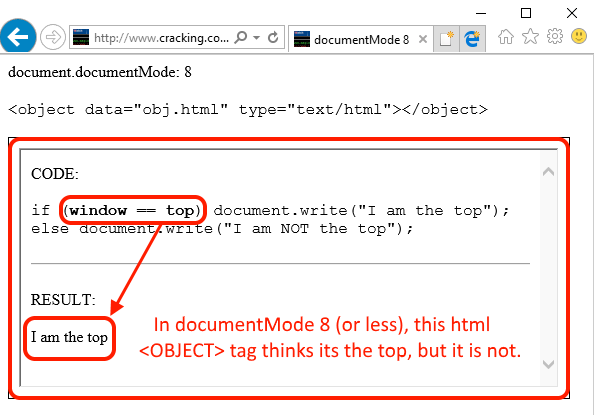
Our object believes it’s the top window, to the point that other members like frameElement return always null, a behavior that only happens on top windows (on IE).
Let’s try the same code without the compatibility tag. It seems that the object now understands its place in the universe and behaves like an iframe.
<!-- COMPATIBILITY META TAG REMOVED -->
<object data="obj.html" type="text/html"></object>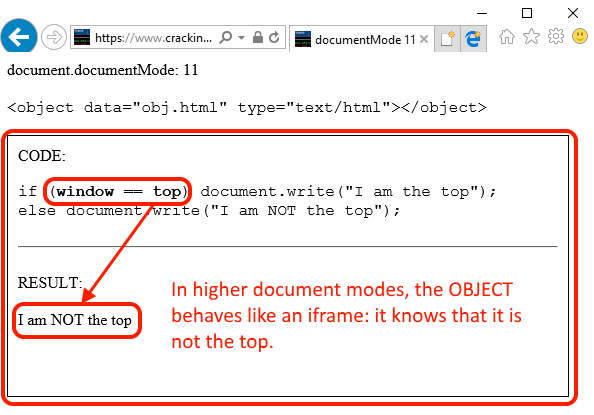
Essentially, the object is being rendered as an independent entity in older document modes but as an iframe in newer ones. Regardless of that, internally both are WebBrowser controls, Trident engines exposing the same members.
Inherited window members
Let’s set back an older documentMode and find a way to exploit this confusion-bug which does not seem to be that bad because cross-domain restrictions are still in place, and the X-FRAME-OPTIONS header works perfectly well. There are members like window.name which are inherited by the object (the object inherits the name of its parent) but that’s not super-bad except for specific advertising technologies which insecurely use the window.name to pass information across iframes.
Having said that, there’s at least one inherited object that really causes trouble: location. Inside an object tag, location.href will return the location of the main (top) window. The code below renders the object with its source pointing to object_location.html, but when we retrieve its location it returns the top instead.
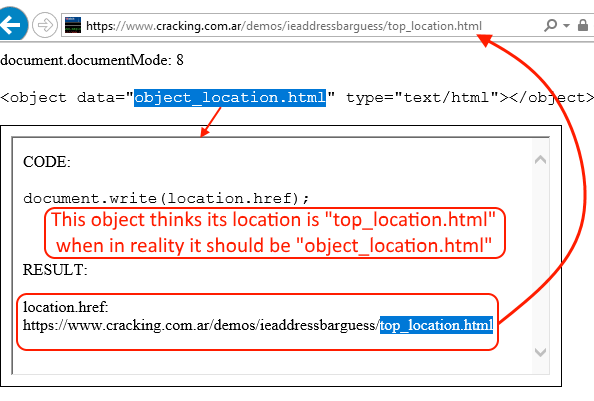
Again, this confusion-bug is not useful because we are still on the same domain. Even if we can retrieve -thanks to the confusion- the location of the top, as long as we are on the same domain things are not exciting. By the way bug hunter, I tried for a few minutes to change the location of the object, but no success. If you want to research on this area I would suggest going deeper because I believe it should be possible. Regardless of that, while trying to achieve a UXSS (persistence is key for everything in life) an interesting bug stumbled upon me: when the object is injected **onbeforeunload **what we get is not the top location anymore, but the location that the browser is going to or, what’s currently written into the address bar.
In other words, if we retrieve the location.href of the object while the user is leaving the main page, we will be able to know what was typed into the address-bar, or, if the user clicked on a link we will know the address of the link that the browser is going to.
For our testing purposes, we will just interrupt the loading of the new site and show the URL to the user. Of course, an attacker would simply post-back the address and load the site anyway making this transparent to the user. Let’s do a simple document.write of the object while the user is leaving.
window.onbeforeunload = function()
{
  document.write('<object data="loc.html" type="text/html" width="800" height="300"></object>');
  document.close();
}
And read the location at that precise moment (onbeforeunload).
document.write("Let me read your mind. You wanted to go here: " + location.href);That’s it! Now we will retrieve the object location when the user is leaving and know exactly what she typed into the address bar. It does not have to be a full URL, for example, if the user types words into the address bar, it will automatically be converted to a search query URL (Bing by default on IE) which can of course be completely read!
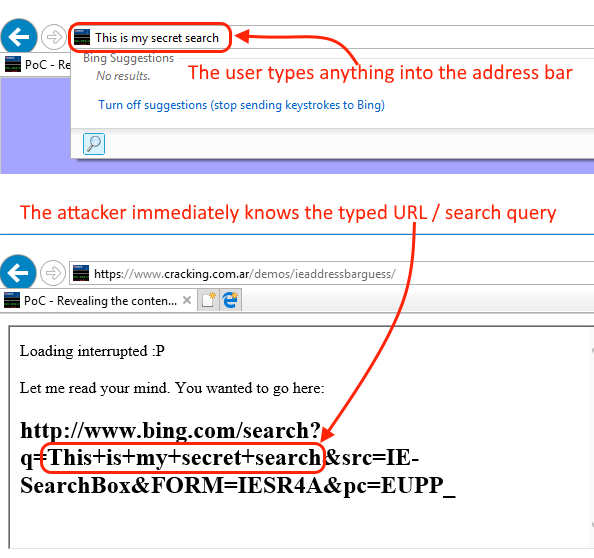
[ Watch the Video ]
Have a nice day, and keep pushing into this object! I’m sure there are tons of things to be discovered.